The 2026 Tech Stack SMBs Should Plan for Now
Planning your technology stack for 2026? This practical guide outlines the modern SMB stack, common anti-patterns to avoid, and a phased implementation framework.
The 2026 Tech Stack SMBs Should Plan for Now
Small and medium-sized businesses face a technology landscape that's both more powerful and more complex than ever. The right technology stack can accelerate growth, improve efficiency, and create competitive advantages. The wrong stack can drain resources, create operational friction, and limit scalability.
This guide outlines the modern SMB technology stack for 2026, common anti-patterns to avoid, and a practical framework for planning and implementation.
The Modern SMB Stack: Core Components
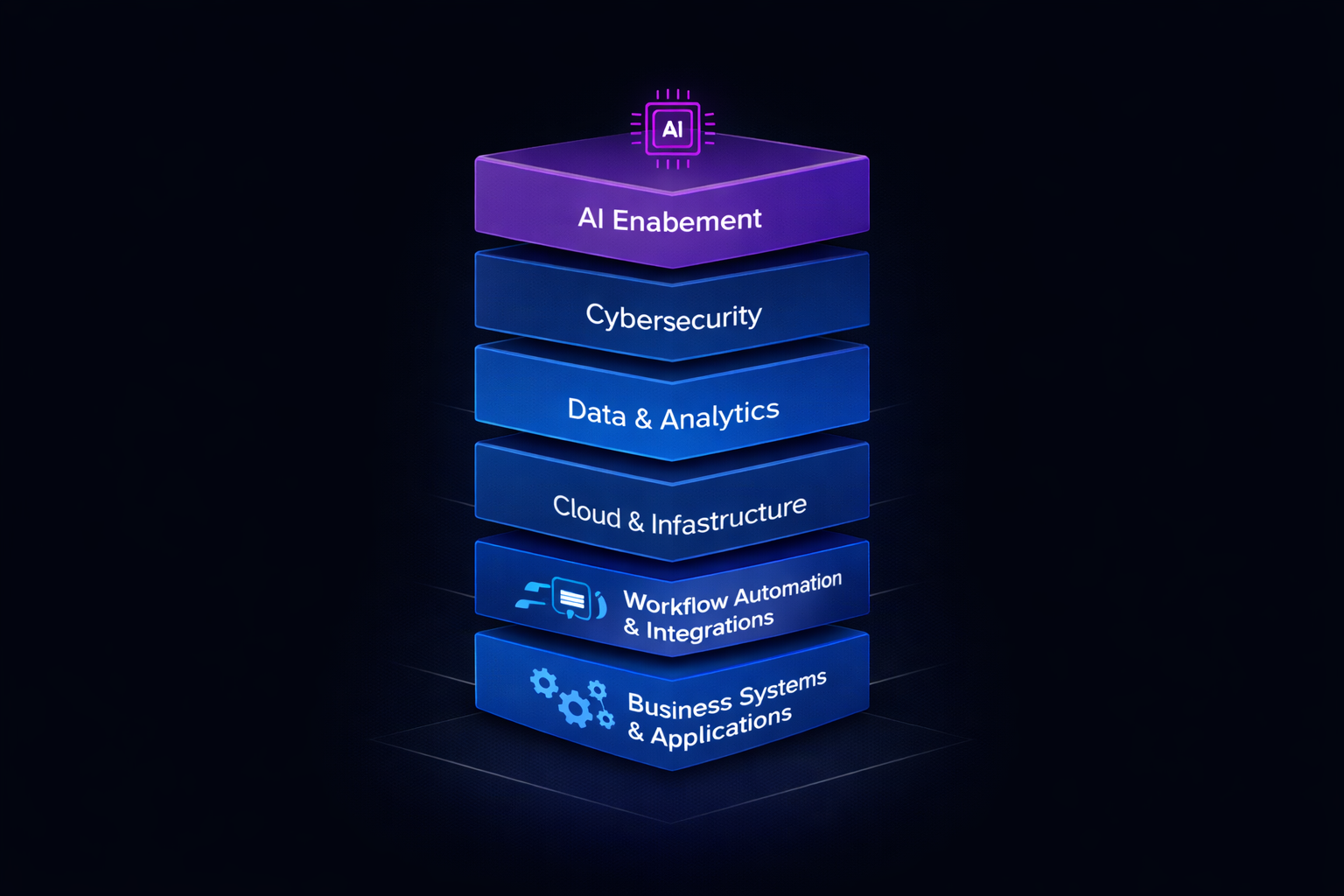
A well-designed technology stack for small and medium-sized businesses includes six core components. Each serves a specific purpose, and together they create a foundation for growth and efficiency.
1. Business Systems & Applications
Purpose: Core operational systems that run your business day-to-day.
Components:
- CRM (Customer Relationship Management): HubSpot, Salesforce, or Pipedrive for managing customer relationships, sales pipelines, and marketing
- ERP/Operations: QuickBooks, Xero, or industry-specific solutions for financial management, inventory, and operations
- Project Management: Asana, Monday.com, or ClickUp for task tracking, collaboration, and project delivery
- HR/People Management: BambooHR, Gusto, or Rippling for employee management, payroll, and benefits
Key Considerations:
- Choose platforms that integrate well with each other
- Start with core functionality; add complexity only as needed
- Prefer platforms with strong mobile apps for remote work
- Ensure data export capabilities for future flexibility
Budget Range: $200-$2,000/month depending on business size and needs
2. Workflow Automation & Integrations
Purpose: Connect systems and automate repetitive tasks to reduce manual work.
Components:
- Integration Platforms: Zapier, Make.com, or Microsoft Power Automate for connecting different systems
- Forms & Data Collection: Typeform, Google Forms, or Airtable for client intake, surveys, and data collection
- API Connections: Custom integrations where needed for unique workflows
- Notification Systems: Twilio, SendGrid, or Slack for automated alerts and communications
Key Considerations:
- Start with high-impact, low-complexity automations
- Document all automations for maintenance and troubleshooting
- Build in error handling and human oversight where appropriate
- Monitor automation performance and adjust as needed
Budget Range: $50-$500/month for integration platforms, plus development costs for custom integrations
3. Cloud & Infrastructure
Purpose: Reliable, scalable hosting and infrastructure for applications and data.
Components:
- Cloud Hosting: AWS, Google Cloud, or Microsoft Azure for application hosting
- Content Delivery: Cloudflare or AWS CloudFront for fast content delivery
- Backup & Disaster Recovery: Automated backups with geo-redundant storage
- Monitoring & Alerting: CloudWatch, Datadog, or New Relic for system monitoring
Key Considerations:
- Right-size resources to control costs
- Implement automated backups and test restore procedures
- Use managed services where possible to reduce operational overhead
- Monitor costs regularly to prevent bill creep
Budget Range: $200-$2,000/month depending on scale and requirements
4. Data & Business Analytics
Purpose: Turn data into insights for better decision-making.
Components:
- Business Intelligence: Microsoft Power BI, Tableau, or Google Data Studio for dashboards and reporting
- Data Warehousing: Centralized data storage for analytics (often included in BI platforms)
- KPI Tracking: Custom dashboards or embedded analytics in CRM/ERP systems
- Reporting Automation: Automated report generation and distribution
Key Considerations:
- Start with data you already have; don't collect data you won't use
- Focus on actionable metrics, not vanity metrics
- Ensure data quality and consistency across sources
- Make analytics accessible to decision-makers, not just analysts
Budget Range: $100-$1,000/month depending on platform and data volume
5. Cybersecurity & Compliance
Purpose: Protect business data, customer information, and ensure regulatory compliance.
Components:
- Endpoint Protection: Antivirus, anti-malware, and device management
- Email Security: SPF, DKIM, DMARC configuration; phishing protection
- Access Control: Multi-factor authentication (MFA), role-based access controls
- Backup & Recovery: Secure, encrypted backups with tested restore procedures
- Compliance Tools: Industry-specific compliance monitoring and reporting
Key Considerations:
- Security is not optional; budget for it from the start
- Implement MFA everywhere possible
- Regular security audits and vulnerability assessments
- Employee training on security best practices
Budget Range: $100-$1,000/month depending on business size and compliance requirements
6. AI Enablement
Purpose: Leverage AI to enhance productivity, automate tasks, and improve customer experience.
Components:
- AI-Powered Tools: ChatGPT, Claude, or embedded AI in existing platforms
- Automation: AI-enhanced workflow automation
- Customer Support: AI chatbots for common inquiries
- Content Generation: AI tools for marketing content, documentation, and communications
Key Considerations:
- Start with low-risk use cases
- Maintain human oversight for high-stakes decisions
- Choose AI tools that integrate with existing systems
- Monitor AI performance and adjust as needed
Budget Range: $50-$500/month depending on usage and platform choices
Anti-Patterns to Stop Doing
Many small businesses fall into these common technology traps. Avoid them.
1. Tool Sprawl
The Problem: Adopting too many disconnected tools that don't integrate, creating data silos and operational friction.
Example: Using separate tools for CRM, email marketing, project management, customer support, and analytics that don't talk to each other.
The Cost:
- Data entry duplication
- Inconsistent information across systems
- Higher total software costs
- Reduced team productivity
The Solution: Choose platforms that integrate well, or use integration tools (Zapier, Make.com) to connect them. Prefer platforms that offer multiple functions (e.g., CRM with built-in marketing automation).
2. Duct-Tape Integrations
The Problem: Connecting systems with fragile, manual processes or poorly documented custom code that breaks when systems update.
Example: Using Excel macros to sync data between CRM and accounting system, requiring manual intervention when either system changes.
The Cost:
- Frequent breakages requiring IT support
- Data inconsistencies and errors
- High maintenance burden
- Limited scalability
The Solution: Use proper integration platforms (Zapier, Make.com, native APIs) with error handling and monitoring. Document all integrations. Plan for system updates and changes.
3. Over-Engineering
The Problem: Building custom solutions when off-the-shelf platforms would work, or implementing enterprise-grade complexity for simple needs.
Example: Building a custom CRM when HubSpot or Salesforce would meet 90% of requirements.
The Cost:
- High development costs ($50,000-$200,000+)
- Long development timelines (6-12 months)
- Ongoing maintenance burden
- Limited feature set compared to mature platforms
The Solution: Start with off-the-shelf platforms. Customize only where you have true competitive advantage. Consider custom development only when platforms are genuinely limiting.
4. Under-Investing in Security
The Problem: Treating security as an afterthought, leading to vulnerabilities and potential breaches.
Example: Using weak passwords, no MFA, unencrypted backups, and no security monitoring.
The Cost:
- Data breaches ($100,000-$1,000,000+ in damages)
- Regulatory fines (GDPR, CCPA, industry-specific)
- Reputation damage
- Business disruption
The Solution: Budget for security from the start. Implement MFA everywhere. Use encrypted backups. Regular security audits. Employee training.
5. Ignoring Data Governance
The Problem: Collecting data without policies for quality, access, retention, or privacy.
Example: Storing customer data indefinitely without retention policies, or giving all employees access to all data.
The Cost:
- Compliance violations
- Data quality issues affecting decision-making
- Security risks from over-permissive access
- Storage costs for unnecessary data
The Solution: Establish data governance policies: who can access what, how long to retain data, data quality standards, privacy compliance.
6. No Technology Roadmap
The Problem: Making technology decisions reactively without a plan, leading to inconsistent choices and wasted investments.
Example: Adopting tools to solve immediate problems without considering how they fit into long-term strategy.
The Cost:
- Inconsistent technology choices
- Wasted investments in tools that don't scale
- Difficulty integrating new systems
- Limited ability to plan for growth
The Solution: Develop a 12-24 month technology roadmap. Align technology decisions with business goals. Review and update roadmap quarterly.
Planning Framework: Roadmap, Phased Implementation, Governance
A successful technology stack requires planning, phased implementation, and ongoing governance.
Phase 1: Assessment and Planning (Months 1-2)
Objectives:
- Understand current technology landscape
- Identify gaps and pain points
- Define business requirements
- Create initial roadmap
Activities:
- Technology Audit: Document all current systems, their purposes, costs, and integration points
- Business Requirements: Interview stakeholders to understand needs, pain points, and goals
- Gap Analysis: Identify what's missing, what's redundant, and what needs improvement
- Budget Planning: Estimate costs for new systems, integrations, and ongoing operations
- Roadmap Creation: Develop 12-24 month implementation plan with priorities and timelines
Deliverables:
- Current state technology inventory
- Business requirements document
- Gap analysis report
- Technology roadmap
- Budget estimate
Phase 2: Foundation (Months 3-4)
Objectives:
- Establish core business systems
- Implement basic security and compliance
- Set up data governance foundations
Activities:
- Core Systems: Implement or migrate to primary CRM and operations systems
- Security Basics: Deploy MFA, endpoint protection, email security
- Backup & Recovery: Set up automated backups with tested restore procedures
- Data Governance: Establish basic policies for data access, retention, and quality
- Integration Foundation: Set up integration platform (Zapier, Make.com) for future connections
Deliverables:
- Core systems operational
- Security measures implemented
- Backup and recovery tested
- Data governance policies documented
Phase 3: Integration and Automation (Months 5-8)
Objectives:
- Connect systems through integrations
- Automate repetitive tasks
- Improve data flow and consistency
Activities:
- System Integration: Connect CRM, operations, and other core systems
- Workflow Automation: Automate high-impact, repetitive tasks
- Data Synchronization: Ensure data consistency across systems
- Monitoring: Set up monitoring and alerting for critical processes
- Documentation: Document all integrations and automations
Deliverables:
- Integrated systems
- Automated workflows
- Data synchronization working
- Integration documentation
Phase 4: Analytics and Intelligence (Months 9-12)
Objectives:
- Enable data-driven decision-making
- Provide visibility into business performance
- Identify optimization opportunities
Activities:
- Data Warehousing: Centralize data from multiple sources
- Business Intelligence: Deploy BI platform and create key dashboards
- KPI Tracking: Define and track key performance indicators
- Reporting Automation: Automate regular reporting
- Analytics Training: Train team on using analytics tools
Deliverables:
- Business intelligence platform operational
- Key dashboards and reports
- KPI tracking in place
- Team trained on analytics
Phase 5: Optimization and Scale (Months 13-24)
Objectives:
- Optimize existing systems
- Scale infrastructure for growth
- Add advanced capabilities
Activities:
- Performance Optimization: Optimize system performance and costs
- Advanced Features: Implement advanced features in existing platforms
- AI Enablement: Add AI capabilities where they add value
- Scalability Planning: Plan infrastructure scaling for growth
- Continuous Improvement: Establish process for ongoing optimization
Deliverables:
- Optimized systems
- Advanced capabilities implemented
- Scalability plan
- Continuous improvement process
Governance: Keeping Your Stack Healthy
Technology governance ensures your stack remains effective, secure, and aligned with business goals.
Technology Review Process
Monthly:
- Review system performance and costs
- Monitor security alerts and incidents
- Check integration health and errors
- Review user feedback and support tickets
Quarterly:
- Assess technology roadmap progress
- Evaluate new tools and platforms
- Review security and compliance posture
- Update budget and cost projections
Annually:
- Comprehensive technology audit
- Strategic planning for next year
- Vendor evaluation and contract review
- Security and compliance assessment
Decision-Making Framework
When evaluating new technology:
- Business Need: Does it solve a real business problem?
- Integration: Does it integrate with existing systems?
- Cost: What's the total cost of ownership (initial + ongoing)?
- Scalability: Will it scale with business growth?
- Support: What level of support and documentation is available?
- Security: Does it meet security and compliance requirements?
Decision criteria:
- Must solve a clear business problem
- Must integrate with existing stack (or have clear integration path)
- Total cost must be justified by expected ROI
- Must be scalable to support growth
- Must have adequate support and documentation
- Must meet security and compliance requirements
Change Management
For system changes:
- Plan: Document the change, rationale, and expected impact
- Test: Test changes in non-production environment first
- Communicate: Notify affected users and provide training
- Implement: Execute change during low-impact window
- Monitor: Watch for issues and gather feedback
- Document: Update documentation and procedures
Tying Back to Innovoid's Services
At Innovoid Tech, we help small and medium-sized businesses build and maintain technology stacks that support growth without unnecessary complexity. Our approach:
Right-Fit Solutions: We help you choose the right technology—whether that's off-the-shelf platforms, custom development, or a hybrid approach—based on your specific needs and budget.
Integration Expertise: We design and implement integrations that connect your systems reliably, with proper error handling and monitoring.
Phased Implementation: We work with you to plan and execute technology rollouts in phases, minimizing disruption while delivering value incrementally.
Ongoing Support: We provide ongoing support, optimization, and governance to ensure your technology stack continues to serve your business as it grows.
Practical Focus: We prioritize outcomes over technology for its own sake. If a simple solution works, we recommend it. If custom development is needed, we build it.
Key Takeaways
-
The modern SMB stack includes six core components: Business Systems, Automation & Integrations, Cloud & Infrastructure, Data & Analytics, Cybersecurity, and AI Enablement.
-
Avoid common anti-patterns: Tool sprawl, duct-tape integrations, over-engineering, under-investing in security, ignoring data governance, and lack of planning.
-
Plan in phases: Assessment → Foundation → Integration → Analytics → Optimization, over 12-24 months.
-
Govern continuously: Establish regular review processes, decision-making frameworks, and change management procedures.
-
Start simple, scale smart: Begin with core systems and add complexity only as needed. Prefer integrated platforms over disconnected tools.
-
Budget realistically: Plan for initial implementation costs plus ongoing operational expenses (typically 2-5% of revenue for most SMBs).
Frequently Asked Questions
Q: How much should small businesses budget for technology?
A: As a general rule, plan for 2-5% of revenue for technology infrastructure and software. This varies by industry—SaaS companies may spend 10-20%, while traditional businesses may spend 1-2%. Include both initial implementation costs and ongoing operational expenses.
Q: Should we build custom solutions or use off-the-shelf platforms?
A: Start with off-the-shelf platforms for 80-90% of needs. Consider custom development only when: (1) you have proprietary data or workflows that create competitive advantage, (2) no platform meets your requirements, or (3) platforms are genuinely limiting your business. Most businesses never need fully custom solutions.
Q: How do we avoid tool sprawl?
A: (1) Choose platforms that offer multiple functions (e.g., CRM with marketing automation), (2) Use integration tools to connect systems that must be separate, (3) Regularly audit your tool stack and eliminate redundant or unused tools, (4) Establish a process for evaluating new tools before adoption.
Q: What's the biggest mistake small businesses make with technology?
A: Making technology decisions reactively without a plan. This leads to tool sprawl, integration problems, wasted investments, and systems that don't scale. Develop a 12-24 month technology roadmap and align decisions with business goals.
Q: How often should we review and update our technology stack?
A: Monthly for performance and costs, quarterly for strategic planning, annually for comprehensive audit. Technology changes quickly; regular reviews ensure your stack remains effective and aligned with business needs.
Q: What if we can't afford all components of the modern stack?
A: Prioritize based on business needs. Start with core business systems (CRM, operations), basic security, and backups. Add other components as budget allows and business needs justify. A phased approach over 12-24 months is normal and recommended.
Next Steps
Building the right technology stack for 2026 requires planning, phased implementation, and ongoing governance. The businesses that succeed are those that start with a clear roadmap, avoid common pitfalls, and make technology decisions that align with business goals.
At Innovoid Tech, we help small and medium-sized businesses plan, implement, and maintain technology stacks that support growth. We focus on right-fit solutions, practical implementation, and ongoing optimization.
Ready to plan your 2026 technology stack? Contact us for a technology assessment. We'll help you evaluate your current systems, identify gaps, and create a roadmap for the next 12-24 months.
Related Resources:
- Our Services - Technology solutions for businesses
- Case Studies - Real technology implementation results
- Blog - More insights on technology strategy and implementation
Comments (0)
No comments yet. Be the first to share your thoughts!