
The Real Cost of Cheap Websites
A low-cost website may save money upfront, but patchwork plugins, weak structure, poor SEO, and fragile systems often cost more in the long run.
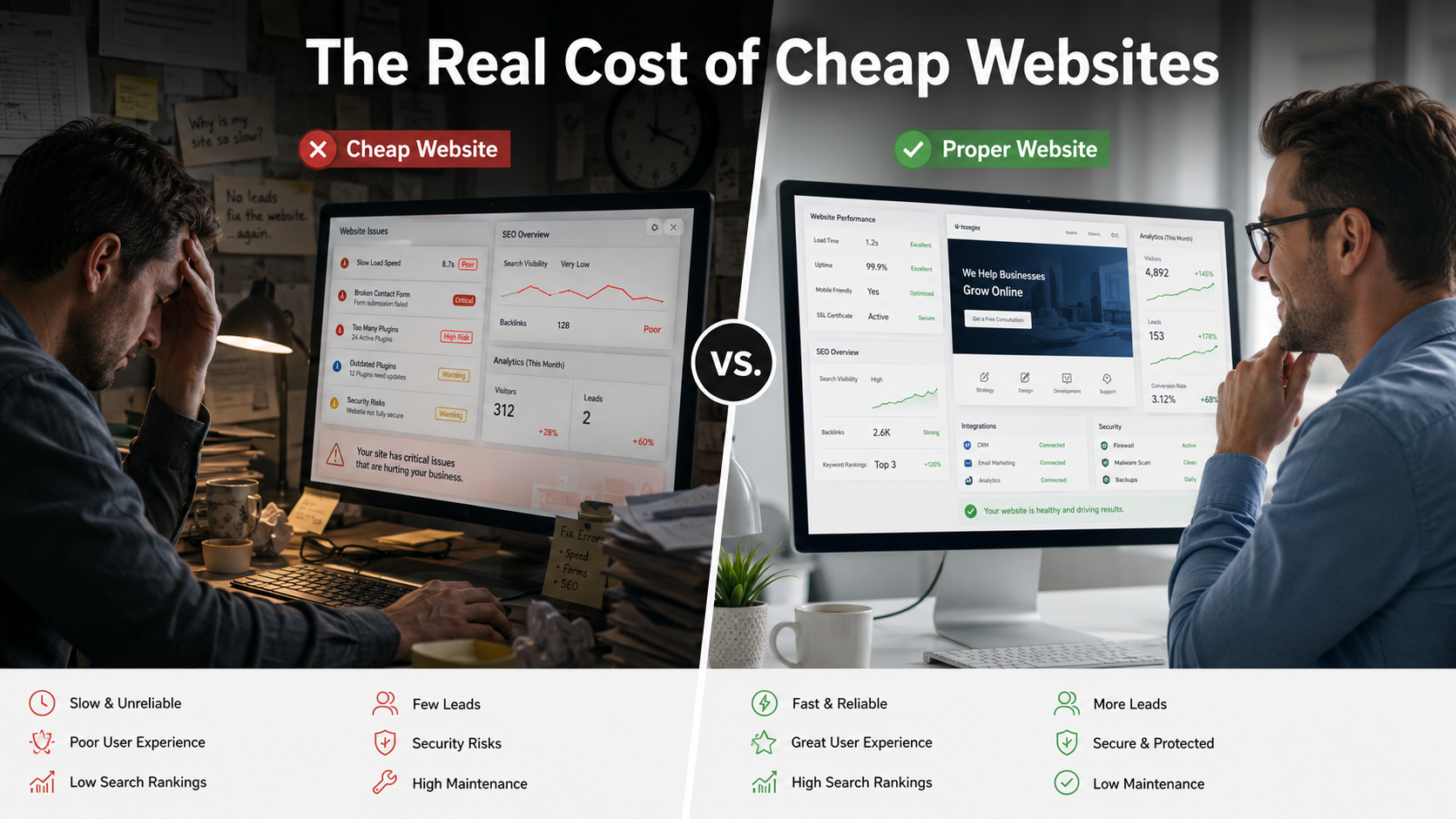
The lowest upfront price is not always the lowest long-term cost — structure, SEO, and integrations matter from the start.
A low-cost website may save money upfront, but patchwork plugins, weak structure, poor SEO, and fragile systems often cost more in the long run.
A cheap website can look like a good deal at first.
The price is low. The timeline is fast. The business finally gets something online. For a small-business owner watching expenses, that can feel like the smart move.
The problem is that many cheap websites are built only to look finished. They are not always built to perform, rank, convert, scale, or support the business long term.
That is where the real cost begins.
A website is not just a digital flyer. It is part of your business infrastructure. It should help customers find you, understand what you offer, trust your business, contact you, and move through the next step. If the site is built without strategy, structure, security, SEO, and future growth in mind, the low upfront price can turn into expensive repairs later.
The cheapest website is often not the lowest-cost website. It is only the lowest initial invoice.
Cheap Websites Usually Hide Their True Cost
A low-cost website may seem affordable because the first payment is small. But the real question is not, "What does it cost to launch?"
The better question is:
"What will it cost if this website does not work?"
A cheap website can become expensive when it:
- does not show up in search results
- loads slowly
- has weak service pages
- fails to convert visitors into leads
- depends on too many plugins
- breaks after updates
- lacks analytics
- has no clear maintenance plan
- cannot connect with business tools
- needs to be rebuilt too soon
That is the part many business owners do not see at the beginning.
The website may look acceptable on launch day, but six months later the owner needs online booking, better lead capture, payment links, quote forms, CRM integration, SEO cleanup, faster page speed, or automation. Suddenly, the cheap website cannot support the business without workarounds.
That is not a bargain. That is deferred cost.
A Website Should Be Built Like Business Infrastructure
A serious business website should not be treated like a one-time design task.
It should be planned like infrastructure.
That means thinking through:
- how customers will find the site
- what services need dedicated pages
- how leads will be captured
- where form submissions will go
- how follow-up will happen
- what tools the website needs to connect with
- how the site will be maintained
- how performance will be measured
- what security protections are needed
- how the site can grow with the business
When those questions are skipped, the website may still look good, but it is underbuilt.
A pretty homepage does not mean the website is ready to support sales, search visibility, automation, or customer communication.
That is the trap.
Patchwork Plugins Create Fragile Websites
Plugins are not automatically bad. Many websites use plugins properly.
The problem starts when plugins become a substitute for planning.
A cheap website may use a separate plugin for every missing function:
- one plugin for forms
- one plugin for SEO
- one plugin for popups
- one plugin for analytics
- one plugin for booking
- one plugin for payments
- one plugin for redirects
- one plugin for image compression
- one plugin for security
- one plugin for email notifications
- one plugin for social media feeds
At first, everything may seem fine. Then updates start happening. One plugin conflicts with another. A form stops sending notifications. A page slows down. A feature breaks. The original builder disappears. Nobody knows which plugin controls what.
Now the business owner has a website that works like a junk drawer.
Something useful may be in there, but good luck finding it when the site breaks.
Plugins should be selected carefully, documented clearly, and used only when they serve a real purpose. A website held together by disconnected add-ons is fragile. It may be cheap to launch, but it is expensive to maintain.
Cheap Websites Often Skip SEO Foundations
A low-cost website may include basic pages, but that does not mean it is built for search visibility.
Many cheap websites skip the SEO foundation that helps customers find the business online.
Common missing pieces include:
- clear page titles
- proper heading structure
- service-specific pages
- local keywords
- metadata
- image optimization
- internal linking
- schema markup
- sitemap setup
- Google Search Console setup
- Google Business Profile alignment
- technical indexability checks
This matters because a website that cannot be found is not doing its job.
A business owner may think, "At least I have a website now."
That is not enough.
If customers are searching for your service and finding your competitors instead, the website is not helping you compete. It is just occupying a URL.
A website that cannot be found is not cheap. It is invisible inventory.
For a deeper look at why visibility fails even when a site looks fine, see Why Your Small Business Website Is Not Showing Up on Google.
Cheap Websites Usually Have Weak Conversion Strategy
Getting visitors to the website is only part of the job.
The site also needs to convert visitors into action.
That means the website should make it easy for someone to:
- call the business
- request a quote
- schedule a consultation
- submit a form
- ask a question
- book a service
- download a resource
- take the next step
Many cheap websites are built with generic sections and weak calls to action.
They may have a contact page, but no real customer journey. They may describe the business, but fail to guide the visitor. They may look nice, but leave people asking, "What am I supposed to do next?"
That is a conversion problem.
A website should not make potential customers work to become leads. If the next step is unclear, people leave. Then the business owner wonders why the website is not generating results.
If your website gets visitors but does not guide them toward calling, booking, requesting a quote, or submitting a form, the site is not selling.
It is decorating the internet.
Cheap Websites Are Often Hard to Connect With Business Tools
As a business grows, the website usually needs to connect with other systems.
That may include:
- customer relationship management systems
- email marketing tools
- SMS platforms
- booking calendars
- payment processors
- invoicing tools
- lead tracking dashboards
- analytics tools
- customer portals
- automation workflows
- inventory or service management systems
Cheap websites are often not built with those connections in mind.
The site may have a basic contact form, but no CRM connection. It may collect leads, but not route them. It may accept inquiries, but not trigger follow-up. It may show services, but not support quote requests, scheduling, or customer intake.
Then the business owner wants to improve operations and discovers the site cannot support the workflow without custom fixes.
That is where patchwork middleware and messy integrations begin.
A form sends data to an inbox. Someone copies it into a spreadsheet. Another tool sends an email. Another tool handles appointments. Another plugin handles payments. Nothing talks cleanly. Nobody owns the full process.
That is not automation. That is digital duct tape.
The more your business grows, the more your website needs to connect with the rest of your operations. If the original site was not built with integration in mind, every new feature becomes a workaround.
See What Small Businesses Should Automate First for a practical priority list before adding more disconnected tools.
Cheap Websites Can Create Security Risk
Security is one of the most overlooked costs of cheap websites.
A low-cost website may launch without a clear plan for updates, backups, access control, monitoring, or recovery.
That creates risk.
Common security problems include:
- outdated plugins
- abandoned themes
- weak administrator passwords
- too many admin accounts
- no backup plan
- poor hosting configuration
- missing SSL setup
- insecure forms
- no malware monitoring
- no update schedule
- no documentation
For a small business, a hacked website is not just a technical inconvenience. It can damage customer trust, interrupt lead generation, expose data, and create cleanup costs.
Security does not have to be complicated, but it does need to be intentional.
A cheap website with no maintenance plan is not a bargain.
It is an unlocked side door.
Cheap Websites Often Lack Ownership and Documentation
Another hidden problem is documentation.
Many business owners do not know:
- who owns the domain
- where the website is hosted
- who has admin access
- what plugins are installed
- what theme is being used
- where form submissions go
- whether backups exist
- how analytics are tracked
- how to update content
- what happens if something breaks
That is dangerous.
If the person who built the website disappears, the business may be stuck. If the site breaks, nobody knows how it was configured. If the business wants to switch vendors, the transition becomes harder than it should be.
A proper website build should leave the business with clear ownership, access, documentation, and a maintenance path.
A website should not become a hostage situation.
Cheap Websites Often Need to Be Rebuilt
This is the part that hurts.
A business may choose a cheap website to save money, only to pay again later for fixes that should have been handled correctly the first time.
The business may need to pay for:
- SEO cleanup
- redesign work
- plugin repair
- speed optimization
- form fixes
- mobile layout corrections
- security cleanup
- hosting migration
- analytics setup
- schema markup
- service page rebuilding
- content rewriting
- full website replacement
At that point, the cheap site was not actually cheaper. It just delayed the real cost.
The most expensive website is not always the one with the higher upfront price. Sometimes it is the cheap one you have to keep repairing, replacing, and explaining.
Cheap Website Approach vs. Proper Website Approach
| Cheap Website Approach | Proper Website Approach | | --- | --- | | Built fast with minimal planning | Built around business goals | | Generic template | Purpose-driven layout | | Plugin-heavy patchwork | Carefully selected tools and integrations | | Basic service descriptions | Clear, service-specific pages | | Weak SEO setup | Search visibility planned from the start | | Generic contact form | Lead capture and follow-up strategy | | No analytics | Tracking and performance review | | No documentation | Clear ownership and maintenance plan | | Hard to scale | Built with future growth in mind | | Lower upfront invoice | Lower long-term repair risk |
The difference is not only design quality.
The difference is whether the website is built as a short-term placeholder or a long-term business asset.
When a Cheap Website Might Be Enough
Not every business needs a complex website on day one.
A simple low-cost website may be acceptable if the business only needs a basic online presence, has no immediate need for SEO, does not rely on website leads, and understands that the site may need to be replaced later.
That is fine as long as the owner knows what they are buying.
The problem is when a business expects a cheap website to perform like a strategic marketing system.
That expectation is usually where disappointment starts.
A starter website should be honest about its limits. A business website meant to generate leads, support local SEO, connect with tools, and scale operations needs stronger planning.
What a Proper Website Should Include
A proper small-business website should include more than a homepage and a contact form.
At minimum, it should consider:
- business goals
- target customers
- service pages
- local SEO
- page structure
- calls to action
- mobile performance
- analytics
- lead capture
- form routing
- basic security
- maintenance plan
- future integrations
- clear ownership
- documentation
This does not mean every business needs an expensive custom platform. It means the website should be built with the business in mind, not just the launch date.
The right website should answer:
- How will customers find us?
- What action do we want them to take?
- What information do they need before contacting us?
- How will we track leads?
- How will we follow up?
- What systems need to connect?
- How will the site be maintained?
- What will we need six to twelve months from now?
If those questions are not part of the build, the business may be buying a future problem.
Search is also changing — see What Is AEO, GEO, and AI Search? for why clarity and structure matter beyond traditional SEO alone.
How Innovoid Tech Solutions Helps
At Innovoid Tech Solutions, we do not treat websites as one-time design projects.
A business website should be part of a larger system that supports search visibility, lead generation, customer communication, workflow automation, analytics, and long-term growth.
That may cost more upfront than a quick template site, but it can prevent the patchwork problems that create bigger costs later.
We look at the full picture:
- website structure
- search visibility
- user experience
- service page strategy
- local SEO
- lead capture
- automation opportunities
- integrations
- security basics
- analytics
- maintenance needs
Our websites & web platforms service is built around clarity, structure, and practical business outcomes — not buzzwords.
The goal is not to build something that only looks finished.
The goal is to build something that works.
Request a Website Build Review
If your current website is slow, hard to update, not showing up in search, failing to generate leads, or held together by too many disconnected tools, it may be time for a website build review.
Innovoid Tech Solutions can help you identify whether your website is built for long-term growth or held together by short-term fixes.
A cheap website may save money at the beginning.
A proper website can save money by preventing the expensive problems that come later.
Schedule a free consultation to request a Website Build Review.
Comments (0)
No comments yet. Be the first to share your thoughts!